
Mobile-first design
Eventure
A self-initiated mobile-first project built on real-world research, Eventure gave me the opportunity to deepen my mobile design skills while creating a solution tailored to real-world user needs.
Topics:
User research, Stakeholder management, Mobile-first design, Usability study, Prototyping, Personas


While working at a company specialising in internal digital solutions, I had the opportunity to collaborate with one of the UK’s top wealth management firms to design a solution for their exclusive events. Through in-depth user research, I gained valuable insights into their needs, behaviours, and challenges, which informed the development of an intuitive event management experience tailored to their brand.
Later, as a personal project, I used this research to explore alternative UI concepts in a mobile-first context. This allowed me to further develop my skills in UI design, experiment with different interactions, and utilise key insights in a different creative challenge —all while reinforcing the core principles of usability and seamless event management.
To avoid breaching confidentiality clauses, I will not disclose the name of the company in this case study.


Table of contents
Details
The project
My Role: UX Research, Product Design, Consultancy
Where: London
When: April 2024 - July 2024
Client overview
Size: +15000 employees
Locations: 23 in the UK
HQ: Bristol
Goal
To deliver a solution that enabled my client to efficiently manage and showcase a wide range of events to their clients and partners, while reinforcing their brand identity with a seamless, elegant experience.
Tools
Figma
Canva
Adobe Photoshop

USER RESEARCH
Overview
I interviewed 20 users in a series of individual and group sessions where I tried to uncover the characteristics of the events, the user behaviours and journeys, their pain points and main motivations.
Methodology
Primary research
Methods
-
1:1 Online Interviews
-
Team workshops
-
Affinity diagramming
Users
20

Group session diagram

Individual interviews diagrams

Key Interview data points
Pain points

“We've got some people registering through Zoom, some will be going through MS form, some through Cvent.”
“Partners can’t add events to their personal calendar easily”
“The capacity [of in-person events] is dictated by the size of the boardroom in the location. At the moment, wait lists are managed by hand and a source of great gnashing of teeth.”
Motivations

“It would be ideal if the Financial Advise practices were able to book directly so the team doesn’t have to spend hours doing the registration for each event”
“There is a desire to make it really clear what one individual is attending across the year: if you've got three different registration sources, databases, somebody would need to piece that all together.”
Behaviours

“We do everything from booking the venue, paying deposits, choosing the wine...We pick all the flowers, all of the candles, the glassware that we send up, absolutely everything; and we send out the invites. There is nothing a third party does for us.”
“A partner signs up on behalf of a client and can potentially accompanies them - clients don’t have access to any of our systems and their only contact point is only their partner adviser”
[We need] “initial notification of the event and automated reminders. And also, if there's a capacity for an event having an automated wait list, so that if somebody cancels the next person who's registered is automatically assigned to the event and receives the diary invite.”
“Our client event feedback is hosted on Microsoft forms and we send out a link at 9:00 o'clock the morning after the event happens.For the bigger conferences we just duplicate the form we use the last time amend some of the wording just to make sure it makes sense and then we send that out via populo.”

Platforms used to manage events at present
MS Forms
SharPoint
PowerApps
PowerBI
Zoom
CVent
Populo
Outlook
Captured events

Partnership & Clients
Partnership exclusive
Yearly number of events for partners: ~406
Yearly number of events for clients: ~24
PERSONAS
Relationship flow
Firm Employee
Supports
Partner
Advises
Client
User story
As a team lead, I want to optimise the registration process so that my team has more time to offer personalised support to both partners and clients.
User story
As a busy front-line professional, I want to manage all my events from a single mobile solution so that I can stay on top of my commitments from wherever I am.
User story
As an old-school person, I want to have an easy experience of seeing which events I am able to join and to contact support if I need to, so that I can plan my calendar without feeling overwhelmed.

Lina Jarvis
Age: 37
Occupation: Operational Manager
Location: Bristol
Family: Single

Rebecca Adsett
Age: 59
Occupation: Financial advisor
Location: Bristol
Family: Married, 2 children

Gordon Clark
Age: 61
Occupation: Retired
Location: Edinburgh
Family: Divorced, 3 children
About
Lina’s team is responsible for delivering 52 private client events and 2 conferences for partners every year. In her current platform, she and her team manually create and share events, send out reminders, feedback forms and supplementary information, which is time-consuming and leads to human errors.
Goals
-
Creating and sharing events with partners and clients
-
Editing events from their laptop to make finding the content easier
Frustrations
-
The system is too manual and based on email communication
-
Difficulty keeping partners informed of changes to the event programmes
-
She feels disconnected from the other event teams in the business
About
Rebecca has access to events that are exclusive for partners, like conferences and learning programmes, and events that include partners and clients, like golf courses and wine tastings. She currently needs to find information about these events in many different places and keeping her calendar organised is a pain. On top of that, she is the only point of contact of her clients with the company, so she needs to manage everything about her clients attendance to an event herself.
Goals
-
Networking and uncovering new client opportunities
-
Enjoying learning and development programmes to continue growing as an adviser
-
Building a solid relationship with her clients
Frustrations
-
No time to spare in complicated admin tasks
-
Usually on the go visiting clients, can’t easily access desktop solutions
-
Emails are often lost in her busy mailbox
-
Sometimes offline
-
Event information is all over the place, using too many platforms
About
Gordon is the owner of a steel manufacturing business, but in recent years he let his children take over most of the day-to-day management of the company. He’s been a client of SJP for 20 years and he thoroughly enjoys the socialising that goes on in their client events. He’s not very confident with technology and needs someone to keep his schedule organised, otherwise he can’t keep up with it.
Goals
-
Following the growth of his wealth
-
Meeting new people
-
Enjoying the benefits of being a client of the biggest UK wealth management firm
Frustrations
-
Not tech savvy
-
Difficulties organising his own agenda, accommodation and travel
USER JOURNEY
Currently, the registration to an event works through a system of requests, where partners will request that they or one of their clients are registered for an event, and a firm employee will do the administrative work behind it. The partner is always a necessary intermediary between clients and the firm.
This user journey was key to understand several major pain points that had an impact not just on Lina’s persona, but affected all three of them as a consequence. Addressing this process provided collateral solutions to some of the pain points expressed by the other populations.


Observations
The current event registration system is inefficient, time-consuming and puts a lot of pressure on the operational teams, who need to jump from one platform to another trying their best not to make the smallest mistake in the process. With 12 major pain points in the user journey, it is taxing when it goes smoothly and potentially very unpleasant when an error occurs.
What did we learn?
-
The use of many different platforms to manage events is creating frustration and wasting time unnecessarily
-
Confirmation messages and reminders are sent manually, keeping employees busy with repetitive tasks instead of using their time to personally support partners and clients
-
Clients depend on partners to provide everything they need for an event, using the partners' time for admin tasks that should not be their job

KEY OBJECTIVES
FEATURES
Freeing the operational team from the current tedious registration process to be able to use their time supporting partners and clients in a more personalised way
-
Automated registration
-
Automated reminders
-
Waiting list
Providing a single solution to all three population’s events requirements that is intuitive and user-centric
-
Single login
-
Personalised dashboard
-
Desktop editorial experience
Enabling the clients to have direct contact with the firm for administrative assistance while still keeping the personal relationship with their trusted adviser
-
Live chat
-
Help desk
Giving partners the tools to help them network and thrive in the business
-
Personal notes about an event
-
Ability to follow other partners and clients
-
Direct messaging
-
Open list of attendees
Capturing and visualising key data about the events attendance rates, feedback and overall success
-
Attendance reports
-
Feedback forms
-
Satisfaction reports
-
Key results over time
-
Live polling
Empowering partners, employees and clients to manage their events easily, independently and efficiently.
-
Events calendar
-
Personal agenda
-
Filtering capabilities

Priorities
Once we had analysed the key needs of the three distinct populations that would make use of the solution, we ran an internal ideation session in which we used the MoSCoW method to define a first MVP outlining the most urgent features to include.
Must have
Should have
Could have
Won’t have
Legend
Providing a space for supplementary materials and past recordings
-
Resource library
THE SOLUTION
1. Partners & clients
A mobile app that allows them to access their events calendar and explore the firm´s vast offer from wherever they may be. The in-built chat ensures that they can be assisted in a personalised, easy way.
2. Firm Employees
A desktop events editor that allows them to create events from their office desk, easily adding the information, documents and visual materials they need to share from the company’s data bases.
Why two different interfaces?
While clients and partners prioritise the intuitiveness, immediacy and flexibility that a mobile solution can provide, employees would benefit from using the editor in a bigger screen that gives them more freedom and control over their actions and resources. Additionally, the risk of employees being contacted reguarly outside of their working hours is also reduced by the dual model, as the events editor interface is tied to their working equipment and not their personal device.
From this moment in the case study, we will focus on the mobile solution for partners and clients.
THE CHALLENGE: MULTIPLE TEAMS
In the firm, there are 4 different teams independently creating and managing events. When a partner or client seeks help, it is important that they reach the team that can help them with their specific issue. Our first challenge was to devise a way to connect them with the right person in the absence of a centralised help desk.
Solution 1: Automatic message on registration
The registration process was a key pain point in the current system, making it a priority for redesign. The existing process relied heavily on manual input from the firm's employees, so we aimed to streamline it by automating general user communications and connecting users with the right support contact.
In the first iteration, users registering for an event automatically received a confirmation chat message from the event manager, offering assistance with event-related inquiries. The registration flow was designed as a gamified, interactive experience with multiple question screens and an estimated completion time provided upfront.

Solution 2: Colour coding & supplementary info
In order to give visual queues and further information about the events and the teams managing them, we assigned a specific colour to each of the teams and event types, as well as icons to the subcategories within them. This colour would in mid and hi-fi prototypes appear behind an events assistan's profile picture, signalling the type of events they manage. We also added an info screen (see in the video below) on the landing page to explain the different types of events that users would find in the app.

Event colours & icons
Team 1
Team 2
Team 3
Team 4

Events:
Client events
-
Exclusive Experience
-
Golf
-
Premium Hospitality
-
Learning

Events:
Personal Development Programme
-
Virtual programme
-
Location event
-
Location conference

Events:
Finance events
-
Fund management events
-
Investment conferences
-
Annual Conference Meeting

Events:
Festivals
-
Annual Symposium
-
Tax Year End Festival
-
Alternative Investment Strategy Festival

TESTING OUR DESIGN
To validate our first prototype, I ran a moderated usability test where I focused on 4 key tasks:
-
Registration process
-
Finding help
-
Finding key events
-
Finding my upcoming events
Participants
-
6 participants
-
Ages: 31 - 62
-
Genders: 4 women, 2 men
KPIs
-
Time on task
-
Drop-off rates

Research questions - What did we want to find out?
-
How long does it take for the user to complete the registration for an event from the landing page?
-
Are users able to successfully access their upcoming events?
-
Are users able to successfully find help when they have an inquiry about an upcoming event?
-
How do users search for events that are useful to them?
Prompts
-
Prompt 1: From the home screen, register for an event
-
Prompt 1 Follow-Up: How easy or difficult was it to register for an event? Is there anything you would change about the process?
-
Prompt 2: Look for a virtual investment-related event
-
How easy or difficult was this task to complete? Is there anything you would change about the process of finding specific events?
-
Prompt 3: You need assistance with the accommodation for an in person conference, seek help
-
How easy or difficult was finding the help you needed? Is there anything you would change?
-
Prompt 4: You would like to see the information about an event that you registered for a few days ago - from the home screen, find it in the app

Analysis

Themes
-
It was observed that 5/6 users didn’t notice the follow-up help message after registration.
-
Most users found that Help was not easy to find, with 3/6 stating that this was the hardest task for them and that it would be useful to see it more prominently throughout the task.
-
The Liked navigation tab was deemed unclear and led to confusion in 4/6 cases
4/6 find the word Calendar unclear as they expected a monthly view of all events. -
Most users appreciate that there is help offered to assist them with their doubts, but would like to have the choice to use additional info to do certain things themselves.
-
Most users did not go straight to Calendar to find their registered events, but once they found it, they appreciated having a space where they could see their events and all events.
Actionable insights
-
Users would appreciate having a more prominent space with general information about the help and assistance that can be provided to them and how to reach out if they need further help.
-
Users would like to have a choice in whether they want to self-service or seek assistance regarding accommodation, transportation and other event-related activities, with useful information being provided in the event card itself if they choose to self-service.
-
Users find the word Calendar unclear and would not necessarily expect to find their registered events there, but they would like to have access to a screen where they can see their events and general events side by side.
UI DESIGN

Icon

Logo

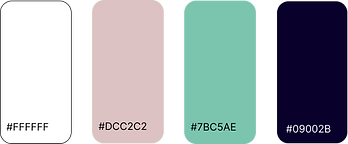
Theme colours
Basic components


Typeface

Why this typeface?
The identity of the firm's brand is that of a consolidated name that can adapt to changes, combining the weight of experience, a resilient nature and the agility to move in the fast-paced contemporary world. We wanted to convey stability and refinement with a serif typeface for the titles while keeping the body text readable, modern and to-thepoint.
Graphic components

HI-FI MOCKUPS & PROTOTYPE
For the hi-fi mockups and first hi-fi prototype, we decided to make improvements to the following areas based on the results of our usability test:
-
Registration and Help
-
Self-service information
-
Event calendar
Registration & Help
While the registration process itself was very successful, found easy and intuitive by 100% of the users, the automated message on registration was not enough for the users to understand and remember who to contact in case they needed help. Furthermore, several users mentioned they would appreciate a more direct access to support, so we made Help more prominent by adding it to the navigation tab instead of Liked, which proved to be confusing for users.
Before
Help was a part of the Messages tab in the main navigation and it was not prominent enough for most users. Some additional information was given in the Home screen, but it was exclusively related to event types, lacking depth in the service offer and feeling a bit hidden.
FAQ
Talk to us


After
Help became its own tab in the main navigation, being very prominent in the design and more fleshed out in its contents.
FAQ became its own tab
Talk to us became its own tab
A tab outlining the available support in an accordeon layout was added to provide context to the user, not assuming they would be aware of the services offered


Self-service information
Some users highlighted how they would prefer to have the option to manage their own bookings and travel information instead of relying on the firm, but they would like to be given the necessary information to do so easily.
We added more information to allow for self-service in the Events card and the contact of the relevant person next to it to cater to both populations: those who want to manage their events themselves and those who need assistance.
Before
Event description
Event details
Suggested materials - this section became Prep reading list
Speakers
Contact
Similar events

Tabs for Hotels, Transport and Services in the area have been added to a dedicated Event details section within the Events Card
After


Event description
Event details
Similar events
Prep reading list
Speakers
Similar events
Event calendar
We updated the name Calendar for Planner in the navigation tab to make it more explicit how people would find their own events as well as general events in it, and we added the content that would previously be found under the Liked section in the navigation as an extra tab in it.
Before

Calendar
After
Planner

The Liked tab became Saved within Planner
Hi-fi prototype


CONCLUSIONS
This project was a valuable opportunity to apply real-world research to my own mobile-first design exploration. While my initial assumptions centred around streamlining event discovery and registration, usability testing revealed a key insight: users had diverse needs when it came to support. Some preferred guidance at every step, while others wanted full control over their experience.
This discovery led me to rethink the app’s navigation, making help and support far more prominent. I refined the design to ensure both user types could easily access the tools they needed—whether that meant step-by-step assistance or a self-sufficient workflow.
Beyond improving my UI design skills, this project strengthened my ability to adapt based on user insights. It reinforced the importance of designing for different user behaviours and gave me the chance to fully embrace a mobile-first approach, something I hadn’t explored in my professional role.